

The “Reservation Entry Does Not Exist” Error: A Field Guide (and the Tool That Actually Fixed It)
If you’ve spent any time supporting Business Central, you’ve probably seen this one:
The Reservation Entry does not exist. Identification fields and values: Entry No.=’XXXXX’, Positive=’Yes/No’
It’s one of those errors that looks small and technical, but quietly blocks whatever you’re trying to do — delete a production order, cancel a sales line, post a receipt — and refuses to explain itself beyond a single cryptic sentence.
Here’s the play-by-play of chasing this one down on a recent implementation, what didn’t work, and the tool that finally cleared it in about thirty seconds.
What’s Actually Going On
Reservation Entries (table 337) live in matched pairs — a “Positive = Yes” side and a “Positive = No” side that reference each other. When BC tries to process something involving a reservation, it looks up both halves of the pair. If one half is missing — an orphaned, one-sided record — you get this error the moment anything touches it.
It’s not new. Variations of it go back to NAV 2009, and it still shows up today, usually left behind after a cancelled reservation, a requisition worksheet action, or some other process that didn’t fully clean up both sides of the pair.
Round 1: The Standard UI Paths
The first instinct is reasonable: if a production order won’t delete because of this error, try clearing the reservation for that line directly — either via a “Cancel Reservation” action on the Reservation Entries page, or by refreshing the order first.
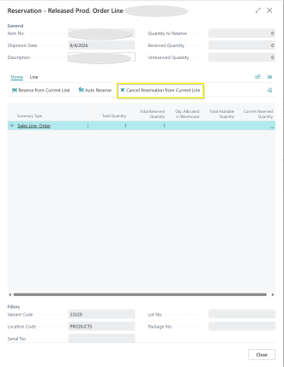
No luck. The error followed the reservation itself as it moved — first blocking the production order delete, then reappearing on a sales order line once we tried to clear the reservation there instead. The call stack made it clear why: the error was coming from inside Business Central’s own CancelReservation codeunit. The standard cancel function was hitting the same missing-pair lookup and failing. That ruled out every normal UI path — line-level cancel, order deletion, sales line reservation clearing all route through the same underlying logic.
Round 2: Configuration Packages
Next up: export table 337 via a Configuration Package, filtered tightly to the one orphaned Entry No., remove it from the file, and apply the package back with “Delete Table Records Before Processing” checked.
This felt like the right level of surgical — no code, no direct database access, just a supported RapidStart mechanism.
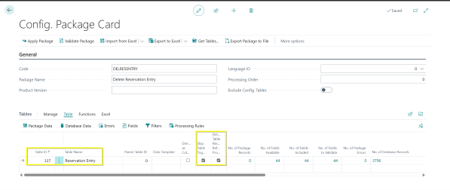
It applied without error. The record was still there.
Tried again with “Skip Table Triggers” also checked, on the theory that a validation rule on the table’s OnDelete trigger was silently blocking the removal (Reservation Entry does have protective logic for certain entry types, similar to what you’ll see if you ever try to delete an assemble-to-order reservation link).
Applied clean again. Record, still there.
Two attempts, no errors, no explanation, and no actual deletion. That’s a frustrating place to be as a consultant — everything looks successful, but nothing changed.
Round 3: The Tool That Actually Did It
This is where Insight Works’ Import Export PowerTool came in — and it turned out to be the easiest fix of the entire process. Rather than routing through configuration package logic or writing a one-off AL codeunit to bypass the table triggers directly, the PowerTool made it possible to just find the orphaned entry and delete it outright, no workaround engineering required.
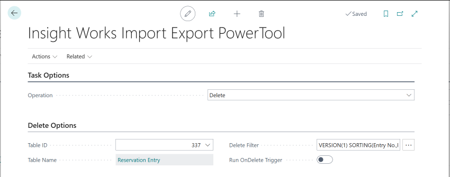
Worth noting: this isn’t a coincidence. Digging into Insight Works’ own product page for the tool afterward turned up a customer testimonial describing the exact same scenario — discovering the tool specifically because of an unfindable, undeletable reservation error that support couldn’t resolve without writing custom code. Apparently this is common enough that it’s part of their sales pitch.
Why This Worked When Config Packages Didn’t
The short version: Import Export PowerTool operates as a more direct data tool than RapidStart, without the same trigger/validation entanglement that seems to protect Reservation Entry from a standard config package delete — even with triggers nominally skipped. Where two different attempts at “Delete Table Records Before Processing” silently no-op’d, PowerTool’s delete function actually reached the row and removed it.
One Important Caution
If you’re using Import Export PowerTool (or any direct data tool) to delete records — do it in a sandbox first. This is a real, uncontrolled delete straight against the table, with no business logic double-checking your work. Before you touch anything in Production:
- Test the exact same deletion in a sandbox copy of the environment first.
- Confirm the record you deleted was actually the orphan, and that clearing it resolves the symptom (try the original action — the reservation cancel, the order deletion, whatever was blocked — right there in sandbox).
- Only then repeat the same steps in Production.
Skipping this step is how a “quick fix” turns into a much longer conversation with your client. Treat direct-delete tools with the same respect you’d give a database script — because that’s effectively what they are.
Takeaways for Fellow BC Consultants
- “The Reservation Entry does not exist” is a data integrity issue, not a user error. It means a one-sided orphaned record is sitting in table 337, and no amount of retrying the original action will fix it.
- The error will follow the reservation, not stay put. If you clear the underlying cause on one document, don’t be surprised if the same orphan resurfaces somewhere else touching the same reservation chain.
- Configuration Packages aren’t guaranteed to force a delete, even with every relevant checkbox enabled. If it applies clean but nothing changes, don’t assume it’s a filter mistake — it may be silently protected table logic.
- Keep Import Export PowerTool in your back pocket. It’s free, and this is exactly the kind of “found no other clean way to do this” situation it’s built for.
If you’re staring down this same error message right now — save yourself the two rounds of dead ends and go straight to PowerTool.
Susan is a Senior Solutions Engineer at LBMC Technology Solutions, a Microsoft Dynamics 365 Business Central partner.